For Vinted sellers

Vinted Photo
Enhancer

Upload a phone photo. Get a Vinted-ready listing image — clean background, even lighting, 4:5 ratio, optional model — in about 30 seconds.

30s

Per photo

4:5

Vinted ratio

€0.19

Per photo

Independent tool. Not affiliated with, sponsored by, or endorsed by Vinted.

This is what buyers see · enhanced photos get tapped

Real transformations

The thumbnail truth

Buyers judge your photo
at feed size. In under a second.

On Vinted, your listing photo is a tiny thumbnail in a scrolling feed. Before anyone reads your title or sees your price, they’ve already decided: tap or scroll past. That decision happens in under a second.

Unenhanced Vinted listing photo at thumbnail size

Scrolled past

Dark, cluttered, blends into the feed

Enhanced Vinted listing photo at thumbnail size

Tapped

Bright, clean, stands out immediately

Same item. Same price. Different photo. Different outcome.

<1s

Buyer decides: tap or scroll

4:5ratio

What Vinted shows in the feed

20photos

Max per Vinted listing — first one decides everything

3xmore

Views on listings with professional cover photos

What it does

Five things the enhancer
fixes for your Vinted listing

Every change is about one thing: making your photo the one buyers tap in a crowded feed.

Background cleanup

Messy bedroom, cluttered floor, creased bedsheet — gone. Replaced with a clean studio or gradient background that lets the garment speak.

4:5 ratio crop

Vinted displays thumbnails in 4:5 portrait. The enhancer auto-crops your photo to that exact ratio — no grey bars, no awkward framing in the feed.

Lighting correction

Yellow ceiling bulbs, dark corners, harsh flash — corrected to even, natural daylight. Colours come out true. Fabric texture shows.

Virtual model

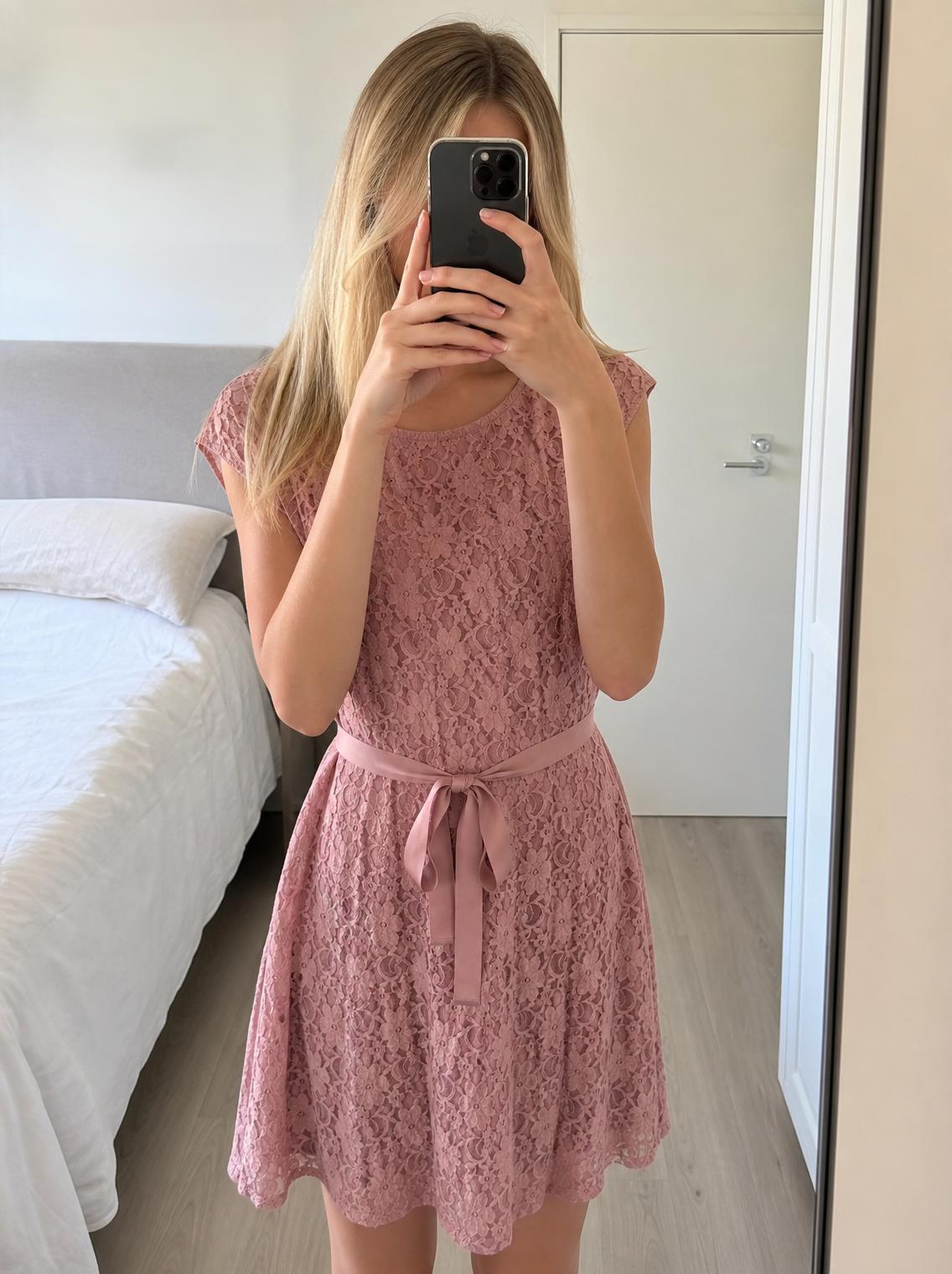
Flat lay becomes on-body. The AI places your garment on a realistic model so buyers can see fit, drape, and style — the biggest driver of taps on Vinted.

Feed optimization

Bright, high-contrast, centered subject — the exact qualities Vinted’s recommendation engine rewards with more visibility. Better photo, more reach.

All in one upload

Every enhancement above happens automatically. You upload one photo. The AI does the rest — no settings, no sliders, no editing skills.

Try it now

How it works

Thirty seconds.
Three steps to a Vinted-ready photo.

From phone photo to listing image. Here’s what actually happens.

01

Upload your phone photo

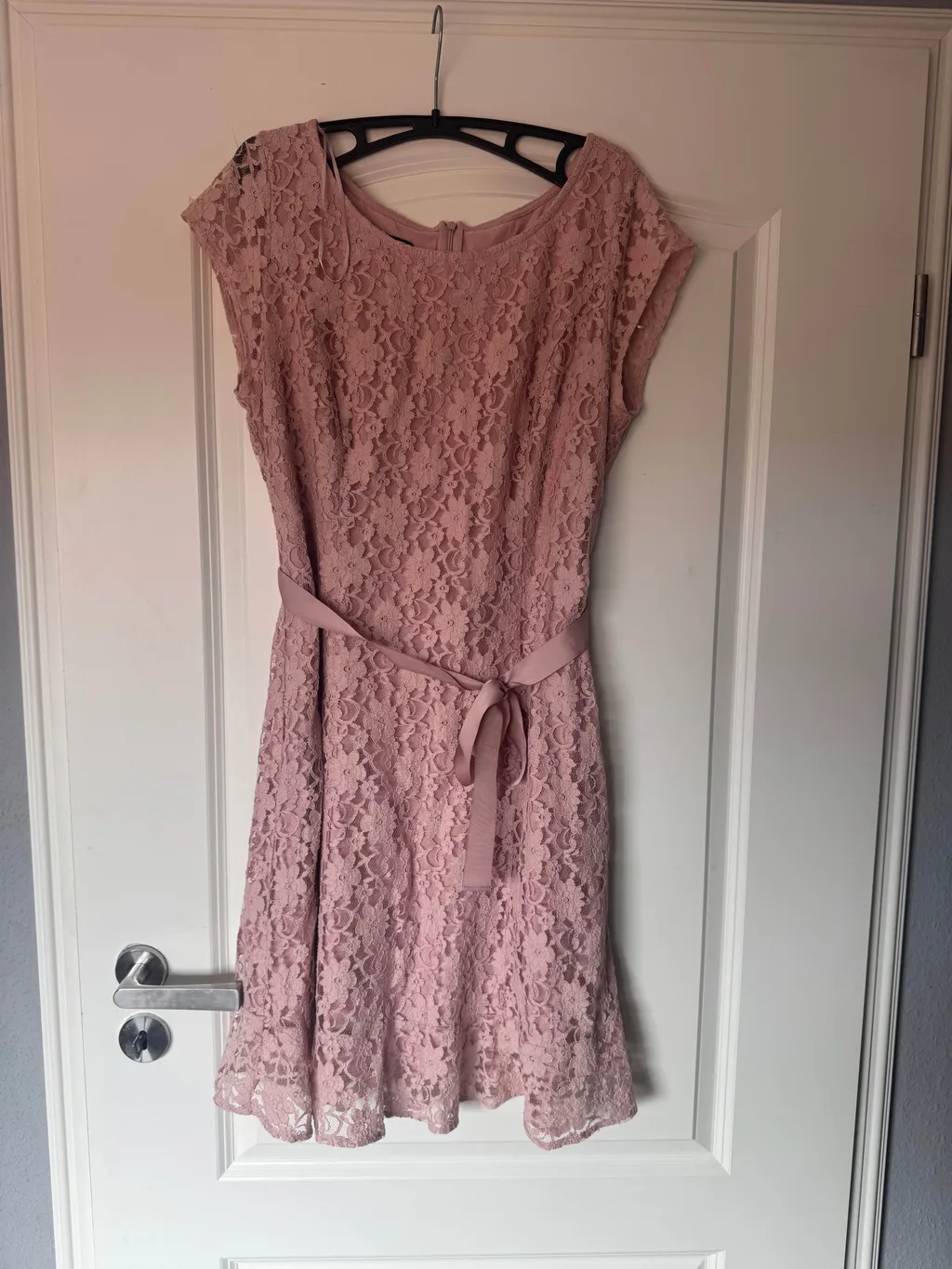
On the floor, on a hanger, over a chair. Daylight helps; perfection doesn’t. If the whole garment is in frame, the AI has everything it needs.

Phone photo of a clothing item
02

AI enhances for Vinted

Background removed. Lighting corrected. Cropped to 4:5. Optional model applied. Every change optimised for how Vinted displays thumbnails.

Original photo being enhanced
Enhanced Vinted-ready photo
Detecting garment 0%
03

Download & list on Vinted

Your enhanced photo is ready. Download it, upload to your Vinted listing, and publish. Also works for Depop, eBay, and anywhere else you sell.

Finished Vinted listing photo 4:5 · Ready

Pink lace dress · Size S

€18

See the difference

Drag to compare.
Real Vinted transformations.

These are actual Vintefy outputs. Same items, same sellers — before and after enhancement.

Drag the slider · tap thumbnails to switch

What actually changes in your Vinted photo

Background

Cluttered room or floor Clean studio or gradient

The AI segments your garment and replaces everything around it with a professional backdrop.

Lighting

Yellow bulb, dark shadows Even, natural daylight

Exposure and white balance are corrected. Colours come out true. Fabric texture is visible.

Aspect ratio

Whatever your phone shot Vinted-perfect 4:5 portrait

Auto-cropped to fill the maximum feed area without grey bars or awkward letterboxing.

Presentation

Flat on the floor Worn on a realistic AI model

The biggest single driver of taps on Vinted. Buyers see fit, drape, and style instantly.

Feed visibility

Blends into the scroll Stands out at thumbnail size

Bright, high-contrast, centered — the qualities Vinted’s algorithm rewards with more impressions.

Vinted photo requirements

Your enhanced photo meets
every Vinted spec. Automatically.

Vinted has specific photo requirements for how listings appear in the feed. The enhancer outputs photos that match all of them — no manual adjustment needed.

Vinted photo spec · auto-checked

0/6 met

4:5 aspect ratio

The ratio Vinted uses in feed thumbnails. Fills maximum screen on mobile without cropping.

1080 × 1350 px

High resolution

Above Vinted’s 800×1000 minimum. Sharp at full zoom, no pixelation.

1080 × 1350 px

Clean background

No clutter, no distractions. The garment is the only thing the eye lands on.

Studio or gradient

Even lighting

No harsh shadows, no yellow cast. True colours, visible texture.

Daylight corrected

Centered subject

Garment is the focal point, not your furniture or your floor.

Auto-centered

JPEG format

Vinted’s accepted format. Optimised file size for fast upload.

Under 20 MB

All specs met — your photo is Vinted-ready.

Why the photo matters on Vinted

Vinted’s algorithm
reads your photo.

Vinted’s recommendation engine doesn’t just show listings randomly. It analyses your photos for brightness, contrast, and subject clarity. A well-lit, clearly-centred photo gets read as quality content — and quality content gets shown to more buyers.

More impressions lead to more taps. More taps lead to more favourites. More favourites signal to the algorithm that your listing is worth pushing to even more people. It compounds.

The same item, reshot with a better cover photo, can behave like a completely different listing — not because the item changed, but because the photo changed how Vinted’s algorithm and buyers both perceive it.

Read the full Vinted algorithm guide

What happens after switching photos

Average change vs. old listings with phone photos

Feed impressions +118%
Taps on thumbnail +96%
Favourites & saves +71%
Messages from buyers +83%

Directional averages reported by Vintefy sellers after switching from flat-lay phone photos to enhanced on-model cover photos. Your results depend on stock, pricing, and category.

Safe for your Vinted account

Present it better.
Never misrepresent it.

Vinted allows AI-enhanced photos as long as the item is shown accurately. Three rules keep your account safe and your reviews five stars.

Lead with the enhanced photo. Back it with real ones.

Use the AI-generated image as your cover, then add real shots of the label, fabric, and any flaws. That combination is what converts browsers into buyers on Vinted.

Never edit out defects.

A stain, a pull, a hole — they stay in the listing, photographed and described. Hiding them costs you the return, the review, and eventually the account.

Check the colour in daylight.

Compare the enhanced photo against the real item. If the shade is off, retake the input photo in better light. Buyers on Vinted expect an exact colour match.

Want the full breakdown? Read our guide: Is AI allowed on Vinted?

Questions

Vinted photo enhancer, answered.

Is using a photo enhancer allowed on Vinted?+

Vinted’s rules come down to one principle: photos must accurately represent the item. Removing a cluttered background, correcting lighting, and showing the garment on a model are presentation choices — not misrepresentation. What you cannot do is hide stains, holes, or defects. Always keep real close-up photos of the label, fabric, and any flaws alongside your enhanced cover photo.

Will buyers know I enhanced my Vinted photos?+

The item in the photo is your real item — its colour, pattern, and details are unchanged. What changes is the presentation around it: the background, the lighting, and whether it’s shown on a model or flat. Most professional Vinted sellers present their items this way. Keep real detail shots in your listing and buyers will trust the photos.

What Vinted photo requirements does the enhancer meet?+

Every enhanced photo is output at the 4:5 aspect ratio Vinted uses in its feed, at 1080×1350 pixel resolution, in JPEG format, under 20 MB. The background is clean, the subject is centered, and the lighting is even. These are the exact specifications Vinted recommends for maximum feed visibility.

What kind of photos work best for Vinted enhancement?+

Tops, dresses, knitwear, jackets, trousers, jeans, and shoes all enhance well. For the best result, photograph the whole item in daylight with nothing covering it. A flat lay on a clean surface or a photo on a hanger both work. The AI handles the rest — background, lighting, and optional model presentation.

How much does it cost to enhance Vinted photos?+

Vintefy processes photos for around €0.19 each, compared to €5–50 for a professional studio shot. Your first generation is free. For high-volume Vinted sellers, bulk credits bring the cost even lower. The return on investment is immediate: better photos mean more clicks, more favourites, and faster sales.

Can I use the enhanced photos on Depop and eBay too?+

Yes. Once you download your enhanced photo, it’s yours to upload anywhere. The 4:5 ratio and clean presentation work well on Vinted, Depop, eBay, Poshmark, and any other marketplace where buyers scroll through thumbnails.

How fast is the Vinted photo enhancer?+

About 30 seconds from upload to finished photo. Most Vinted sellers enhance an entire evening’s worth of listings in under an hour — photo, title, description, and suggested price all generated from a single upload.

Is this tool affiliated with Vinted?+

No. Vintefy is an independent app built for people who sell on Vinted and other marketplaces. It is not affiliated with, sponsored by, or endorsed by Vinted. The name is used here only to describe what the tool is for — enhancing photos for Vinted listings.
One photo is all it takes

Your next Vinted listing is
one photo away.

Upload a phone photo. Get a Vinted-ready listing image with the right ratio, clean background, and studio lighting — in about 30 seconds.

Enhance your Vinted photos

≈€0.19 per photo  ·  ready in ≈30 seconds  ·  no studio needed

Free tools & guides for Vinted sellers

Enhance your Vinted photos →

Try Vintefy